

Acquire Customers
Marketing spend divided by CAC determines new customers for each period.


It is an editable five-year Excel forecast that links membership acquisition, active customer cohorts, monthly fees, costs, and core financial statements.
Use the workbook to plan how a direct primary care practice can build an active membership base, price each tier, fund operations, and review projected financial performance.
Editable assumptions feed the monthly calculation engine, which rolls operating choices into annual projections, scenario comparisons, statements, and management reporting.
The model converts marketing spend into new customers, allocates them across membership tiers, retains active cohorts, and multiplies active customers by monthly fees.
Marketing spend divided by CAC determines new customers for each period.
New customers are distributed across the selected membership tiers.
Starting customers and unexpired cohorts form active customers under the model retention convention.
Active customers in each tier are multiplied by that tier’s monthly fee.
Monthly tier revenue is summed across all enabled tiers and forecast periods.
The Revenue Assumptions sheet connects marketing, CAC, starting customers, tier allocation, customer lifetime, and monthly membership fees to active-customer revenue.
 REVENUE ASSUMPTIONS
The COGS & Operational Expenses sheet separates direct costs, variable operating expenses, and fixed expenses so they can flow into margins and cash needs.
 COGS & OPERATIONAL EXPENSES
The Scenario Analysis view compares Low, Base, and High outcomes for revenue, gross margin, contribution margin, and EBITDA across the forecast period.
 SCENARIO ANALYSIS
The Dashboard combines setup controls, scenario outputs, revenue mix, profitability, cash flow, core financials, and investment payback into one management view.
 DASHBOARD
The ready-made model fits recurring membership revenue with editable acquisition and retention drivers; materially different economics or reporting may call for custom structure.
The template is a planning starting point, not a guarantee of performance.
Financial Models Lab can build or adapt a model when your revenue logic, operating schedules, or reporting requirements differ from the ready-made workbook.
ORDER A CUSTOM FINANCIAL MODELAfter checkout, you receive the editable Direct Primary Care Practice financial model workbook for immediate download and use with your own assumptions.
Update the practice-specific inputs and financial assumptions directly in the Excel model.
Review monthly and annual projections across the five-year modeling horizon.
Compare Low, Base, and High cases through the workbook’s scenario view.
Review the Income Statement, Cash Flow Statement, Balance Sheet, and management outputs.
The essential answers are visible in full, with no accordion clicks required.
It multiplies active customers in each membership tier by the matching monthly fee, then sums revenue across tiers and periods.
You can change launch timing, starting customers, marketing budget and seasonality, CAC, tier allocation, customer lifetime or churn convention, and monthly fees.
The Scenario Analysis view compares Low, Base, and High paths for revenue, gross margin, contribution margin, and EBITDA.
The workbook includes an Income Statement, Cash Flow Statement, Balance Sheet, Dashboard, Scenario Analysis, Summary, Break-Even, ROIC, Charts, and KPIs.
Yes. Custom modeling can adapt revenue logic, operating schedules, or reporting when your requirements differ from the ready-made structure.
It is a planning forecast driven by editable assumptions, not a guarantee of business performance or financial results.
This comprehensive package includes everything you need to build a complete financial plan for your Direct Primary Care practice.
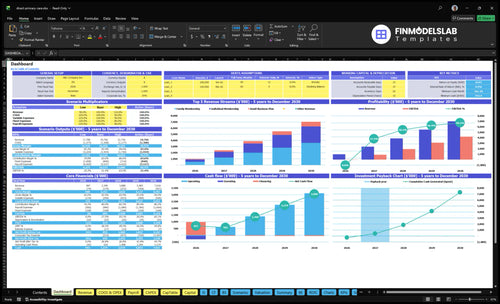
Core inputs and core outputs

Three scenario analysis
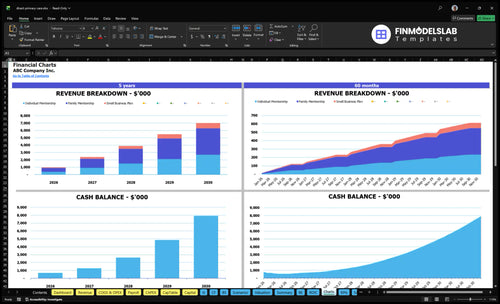
Presentation ready

DuPont analysis

Researched revenue assumptions
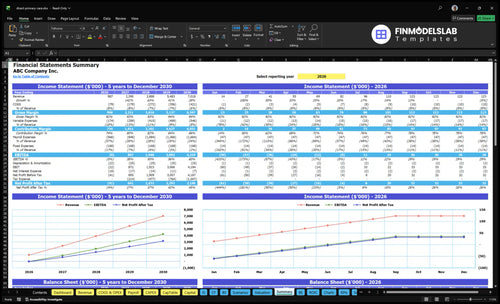
Lender-friendly financial outputs

Revenue stream detailed view

Performance metrics benchmark

I didn’t know where to start, and this template gave me a full path instead of a blank spreadsheet. It saved me hours and made my first draft easy to explain.

I’m not strong with advanced Excel, so this was a relief. The layout and prebuilt sections let me build the model in about an afternoon without getting stuck on formulas.
One broken formula used to make me second-guess everything, but this model stayed easy to trace. I felt confident sharing the numbers and booked a meeting with my advisor the same day.