

Set Property Rent
Set rentable units or area and market rent, or use the property-level monthly-rent input.


This editable workbook forecasts property-level rental income over five years, with monthly and annual detail, scenario analysis, and integrated financial statements.
Use the model to plan rental income, operating costs, capital investment, financing, and cash requirements across multiple Foreign Trade Zone properties.
Editable property and lease assumptions flow through the model’s calculations into revenue, profitability, cash flow, balance sheet, and return reporting.
The model builds rental revenue by property from rent potential, occupancy, concessions, other income, and credit loss, then sums monthly EGI.
Set rentable units or area and market rent, or use the property-level monthly-rent input.
Multiply potential gross rent by occupancy to calculate occupied rent for each property.
Apply concessions to occupied rent, then add enabled parking, storage, CAM, utilities, laundry, fees, and other income.
Subtract credit loss from combined property income to calculate monthly Effective Gross Income.
Sum monthly EGI across properties after each rent-start date; keep any property sale outside recurring rental revenue.
The Rent Revenue sheet organizes each property’s rent start, monthly rent, occupancy, effective gross income, and property operating expense assumptions.
 RENT REVENUE
The Corp_OPEX sheet separates variable expenses from fixed operating costs and schedules spending by category, timing, and periodicity across the forecast.
 CORP_OPEX
The Scenarios view compares Low, Base, and High cases across revenue, net operating income, and operating income over the five-year forecast.
 SCENARIOS
The Dashboard combines setup controls, scenario multipliers, key financial outputs, investment metrics, and charts for a consolidated management view.
 DASHBOARD
The template fits property-level rental planning with editable lease and operating assumptions; structurally different revenue logic may require custom modeling.
The template is a planning starting point, not a guarantee of performance.
Financial Models Lab can build or adapt a model when the buyer needs different revenue logic, operating schedules, or reporting.
ORDER A CUSTOM FINANCIAL MODELAfter checkout, you receive the editable financial model for five-year monthly and annual forecasting, scenario analysis, and financial reporting.
Update property timing, rent, occupancy, concessions, credit loss, escalation, ancillary income, costs, staffing, capital, and financing assumptions.
Review five years of projections with monthly and annual financial detail.
Compare Low, Base, and High cases across revenue and operating performance.
Review the P&L, cash flow statement, balance sheet, Dashboard, and related management outputs.
The essential answers are visible in full, with no accordion clicks required.
It calculates occupied rent from property rent potential and occupancy, applies concessions and other income, subtracts credit loss to reach monthly EGI, then sums active-property EGI. Any property sale is modeled as an exit, not recurring rental revenue.
You can change property type, rent-start date, rentable units or area, market rent, occupancy or lease-up, concessions, credit loss, rent escalation, and enabled other-income categories.
The Scenarios view compares Low, Base, and High paths for revenue, net operating income, and operating income over the five-year forecast.
The workbook includes a Dashboard, Income Statement, Cash Flow Statement, Balance Sheet, Scenarios, Summary, and additional management and return views.
Yes. Financial Models Lab can build or adapt a model when you need different revenue logic, operating schedules, or reporting structures.
It is a planning forecast driven by editable assumptions, not a guarantee of business performance, funding, profitability, or returns.
This comprehensive template includes everything you need to build a complete financial plan for your Foreign Trade Zone operation, from initial acquisition to eventual exit.

Core inputs and core outputs

Three scenario analysis
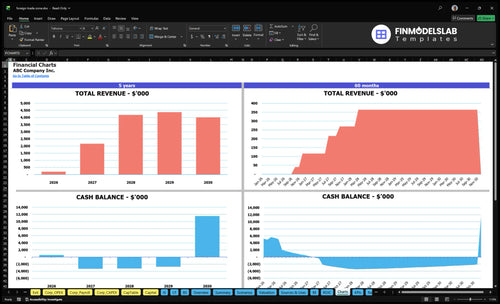
Presentation ready

DuPont analysis
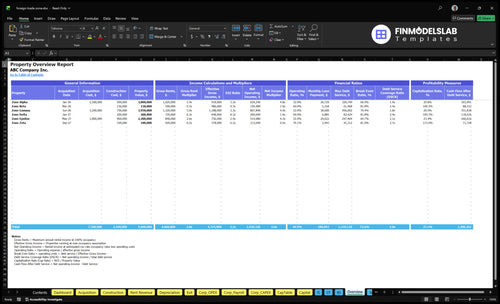
Researched revenue assumptions

Lender-friendly financial outputs
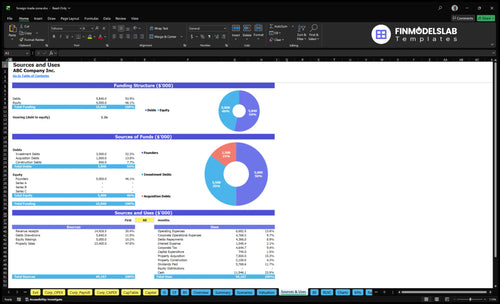
Revenue stream detailed view
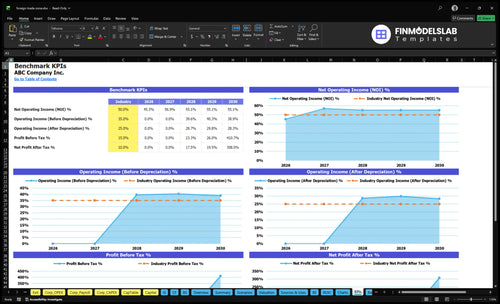
Performance metrics benchmark

Building the model by hand would’ve eaten up my week, but this template got me moving in an afternoon. I had the first draft ready fast enough to book a follow-up call with our partner the same day.
The pricing, operating costs, and growth inputs were all in one place, so I wasn’t chasing numbers across tabs. It made our planning discussion a lot clearer, and I could explain the assumptions in one meeting.
I liked having a model that already handled the math cleanly, because one broken formula can throw off the whole forecast. I spent less time checking cells and more time reviewing the numbers with confidence.