

Set Capacity
Define available places by program or category, including the timing of planned capacity additions.


This editable five-year workbook models school capacity, occupancy, monthly fees, ancillary revenue, costs, scenarios, linked statements, and management reports.
Use the workbook to translate program places, occupancy assumptions, tuition fees, ancillary revenue, launch timing, and capacity additions into a structured five-year school forecast.
Editable operating assumptions feed cost, payroll, capital, scenario, statement, and dashboard schedules so planning changes flow through the model outputs.
Revenue is driven by available places, occupancy, monthly fees, and optional ancillary revenue, with launch timing, capacity changes, and seasonality applied through the forecast.
Define available places by program or category, including the timing of planned capacity additions.
Multiply available places by the occupancy rate or occupancy ramp to calculate occupied places.
Multiply occupied places by the monthly fee per place to calculate base monthly revenue by group.
Multiply occupied places by extra monthly revenue per place when enabled, then apply launch timing and seasonality.
Sum base and ancillary revenue across groups each month, then total active months for annual revenue.
The Revenue sheet organizes launch timing, program capacity, occupancy, monthly fees, and extra revenue per occupied place across the five-year forecast.
 REVENUE
The COGS & OPEX sheet separates direct costs, variable expenses, and fixed operating expenses with assumptions feeding monthly forecast calculations.
 COGS & OPEX
The Scenarios view compares Low, Base, and High trajectories for revenue, gross margin, contribution margin, and EBITDA across the five-year forecast.
 SCENARIOS
The Dashboard combines model setup, scenario controls, financial metrics, revenue mix, profitability, cash flow, and payback views in one management screen.
 DASHBOARD
The ready-made model fits schools that forecast finite program capacity and occupied places; materially different revenue or operating structures may require custom modeling.
The template is a planning starting point, not a guarantee of performance.
Financial Models Lab can build or adapt a model when you need different school revenue logic, operating schedules, financing mechanics, or financial reporting.
ORDER A CUSTOM FINANCIAL MODELYou receive an editable Excel and Google Sheets-compatible workbook with five-year projections, Low/Base/High scenarios, financial statements, and management reporting for a Montessori school.
Update launch date, program capacity, occupancy, monthly fees, ancillary revenue, costs, staffing, and capital assumptions.
Review five years of projections with 60 months of detail and annual financial reporting.
Compare Low, Base, and High cases across revenue, margins, and EBITDA.
Use linked income statement, cash flow, balance sheet, summary, dashboard, and management views.
The essential answers are visible in full, with no accordion clicks required.
It calculates occupied places from available capacity and occupancy, multiplies occupied places by monthly fees, adds optional ancillary revenue, and sums revenue across groups and active months.
You can edit launch date, places by group, occupancy rates or ramps, monthly fees, extra revenue per place, capacity additions, group definitions, active months, and seasonality when used.
You can compare alternative Low, Base, and High trajectories for revenue, gross margin, contribution margin, and EBITDA across the five-year projection.
Included outputs include the dashboard, summary, income statement, cash flow, balance sheet, break-even, ROIC, charts, ratios, valuation, and KPI views.
Yes. Financial Models Lab can build or adapt a model when your revenue logic, operating schedules, financing mechanics, or reporting requirements differ from the ready-made structure.
It is an editable financial forecast based on assumptions, not a guarantee of school performance or financial results.
Your purchase includes a comprehensive and user-friendly Excel financial model for a Montessori preschool, complete with a dynamic dashboard, detailed financial statements, and dedicated schedules for wages, capital expenses, and all core assumptions.
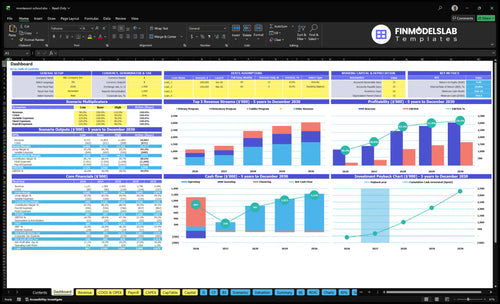
Core inputs and core outputs

Three scenario analysis

Presentation ready
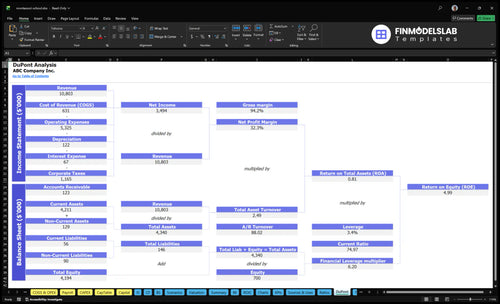
DuPont analysis
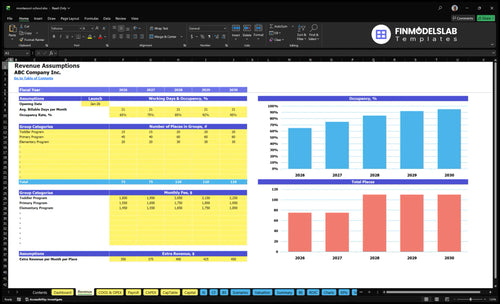
Researched revenue assumptions
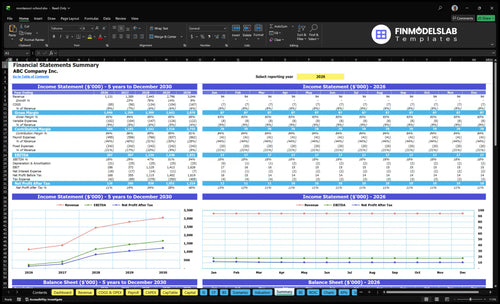
Lender-friendly financial outputs
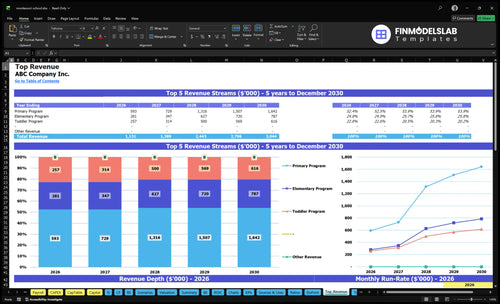
Revenue stream detailed view

Performance metrics benchmark

This template made profitability easy to see, so I could spot break-even much faster and explain the numbers without guessing. It saved me several hours of back-and-forth before our planning meeting.

I liked how the formulas were already set up cleanly, which cut my worry about one broken cell throwing off the whole model. I finished my first full review in one afternoon instead of two.
I’m not an Excel power user, and this model still felt approachable from the start. The layout helped me build a full school forecast without hiring extra help, and I had a usable draft ready the same day.