Editable Community Bank Financial Model in Excel

Five-year projections, dashboard, P&L, cash flow, balance sheet, and three scenarios - pre-built in Excel and Google Sheets. Built by ex-CFOs. Delivered as an instant download.
Community Bank Financial Model - overview hero showing the model’s purpose: comprehensive bank projections, key KPIs, runway and performance summary for investor-ready presentations and clear cash-flow visibility
Fully Editable
Instant Download
Professional Design
Pre-Built
No Expertise Is Needed
Community Bank Financial Model - overview hero showing the model’s purpose: comprehensive bank projections, key KPIs, runway and performance summary for investor-ready presentations and clear cash-flow visibility
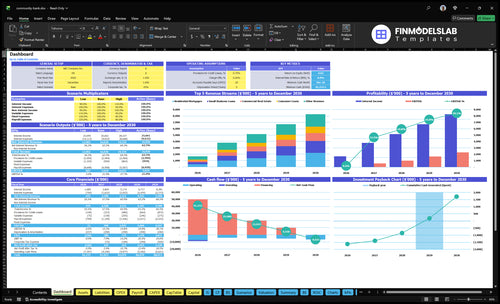
Community Bank Financial Model dashboard summarizes key KPIs, runway and cash position with a dynamic dashboard, highlighting performance trends and investor-ready charts to close cash-flow blind spots
Community Bank Financial Model ROIC calculation and charts showing return on invested capital, capital efficiency and profitability timing to help assess investment returns and support investor-ready analysis.
Community Bank Financial Model break-even calculation and charts showing contribution margin, fixed vs variable costs and the break-even point to identify when operations become profitable and avoid cash-flow blind spots
Community Bank Financial Model financial charts visualizing key metrics—loan growth, deposits, net interest margin, profitability and liquidity—for stakeholder reporting and polished dashboard-ready presentation.
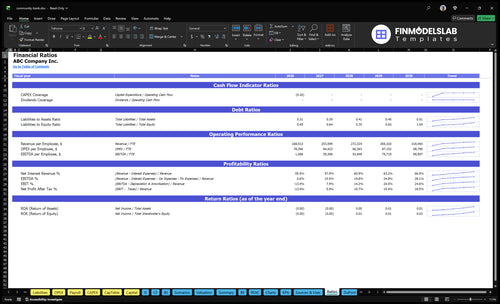
Community Bank Financial Model ratios dashboard showing key ratio analysis (liquidity, capital adequacy, efficiency, profitability) to assess performance, drivers and timing of returns with investor-ready clarity and error checks
Community Bank Financial Model valuation showing discounted cash flow and market comparables to estimate enterprise value and shareholder returns, clarifying value drivers and investor-ready outputs
Community Bank Financial Model revenue inputs showing customizable interest income, fee schedules, loan growth drivers and deposit assumptions to model core revenue streams; user-friendly for scenario testing.
Community Bank Financial Model COGS & operating expense inputs allowing customization of interest expense, fee costs, branch & IT overheads and variable cost drivers for scenario-ready forecasts.
Community Bank Financial Model capex inputs showing capital expenditure categories and timing, letting users customize asset purchases, depreciation schedules and funding needs for scenario-ready forecasting.
Community Bank Financial Model payroll inputs tab showing staffing, salaries, benefits and hiring schedules so users can customize headcount costs, model payroll-driven cash flow and scenario-ready staffing assumptions.
Community Bank Financial Model scenarios charts comparing low, base and high cases to test loan growth, deposit behavior and funding needs, helping fix weak scenario testing and plan runway.
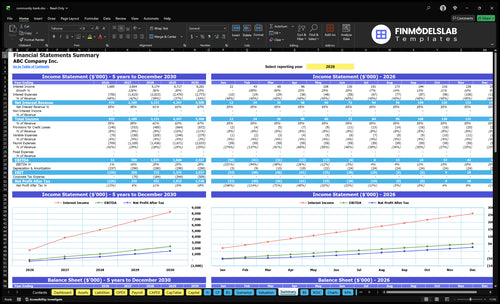
Community Bank Financial Model financial summary report showing consolidated P&L, cash flow runway and balance sheet highlights to assess liquidity, profitability and funding needs for investors.
Community Bank Financial Model income statement report showing automated P&L projections and expense/revenue drivers to assess profitability, margins and investor-ready forecasts for clarity on performance.
Community Bank Financial Model cash flow report showing projected cash inflows, outflows and runway, delivering automated cash flow forecasting and liquidity insight to surface cash‑flow blind spots for lenders and management.
Community Bank Financial Model balance sheet report showing assets, liabilities and equity position with automated consolidation to assess solvency, capital structure and liquidity for investor-ready reporting
Community Bank Financial Model top expenses report showing major cost categories and drivers, delivering a clear breakdown of operating expenses to inform budgeting, cost control and investor-ready forecasts
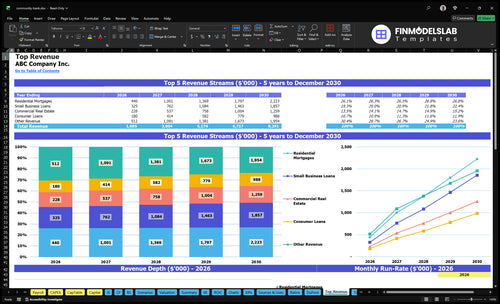
Community Bank Financial Model top revenue report showing largest revenue streams, contribution breakdown and trends to reveal key income drivers and support investor-ready forecasting and clarity for revenue strategy
Community Bank Financial Model sources and uses report detailing funding sources, deployment of capital and startup costs to clarify funding plan, investor-ready layout for clear expectations
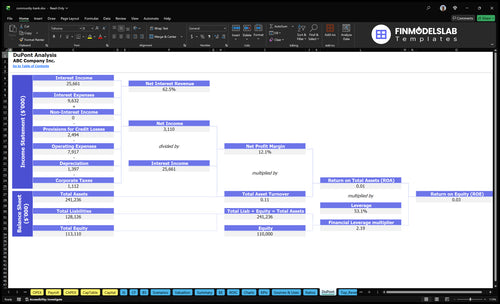
Community Bank Financial Model Dupont report showing return-on-equity drivers (profit margin, asset turnover, leverage) to analyze profitability drivers and investor-ready performance insights.
Community Bank Financial Model captable inputs and calculations showing ownership, equity rounds, dilution and investor shares; lets users customize stakeholders, share classes and fundraising scenarios for clear investor-ready cap table.
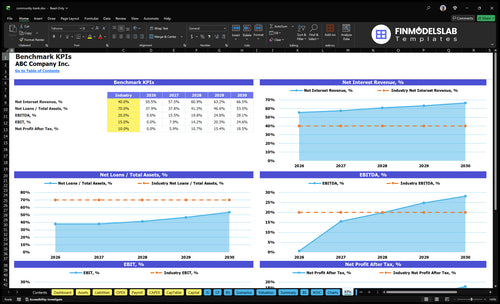
Community Bank Financial Model KPI charts visualizing key metrics—net interest margin, loan growth, deposits, ROA/ROE and liquidity—to support stakeholder reporting with polished, dynamic visuals.
Community Bank Financial Model OPEX inputs showing operating expense categories and drivers, letting users customize costs, growth rates, and timing for scenario-ready, fully customizable forecasts
Fully Editable
Instant Download
Professional Design
Pre-Built
No Expertise Is Needed
Community Bank Bundle
See included products:
Financial Model iCommunity Bank Bundle Financial Model template included in this product.
$149 $109
ADD TO YOUR ORDER
Business Plan iCommunity Bank Bundle Business Plan template included in this product.
$79 $59
Pitch Deck iCommunity Bank Bundle Pitch Deck template included in this product.
$49 $29
YOU SAVE $0 TODAY
30-Day Money-Back Guarantee
Created by a Former CFO
Updated for 2026
One-Time Purchase
Description
MODEL OVERVIEW

What Is the Community Bank Financial Model?

The Community Bank Financial Model is an editable five-year workbook for forecasting bank spreads, non-interest income, monthly and annual statements, and management reports.

Use the workbook to plan how earning-asset balances, asset yields, funding balances, funding rates, and fee income shape a community bank forecast.

Editable operating assumptions flow through monthly calculations into the income statement, cash flow, balance sheet, scenarios, dashboard, and other product reports.

Built for bank spread modeling Principal asset and liability balances drive interest calculations; they are not treated as operating revenue.
COMMUNITY BANK REVENUE ENGINE

How Does the Community Bank Generate Revenue in This Model?

The model calculates monthly interest income from average earning assets and yields, subtracts funding interest expense, then adds allocated non-interest income.

01

Set Earning Assets

Enter average balances and annual yields for mortgages, business loans, consumer loans, cards, securities, and other earning assets.

02

Interest Income

Calculate monthly interest income for each asset category as average balance × annual yield ÷ twelve, then sum the categories.

03

Funding Cost

Apply annual funding rates to average deposits and other funding balances, divide by twelve, and sum monthly interest expense.

04

Add Other Income

Subtract total interest expense from total interest income, then add monthly allocated non-interest income by enabled category.

05

Operating Income

The result is total monthly banking operating income from net interest income plus non-interest income.

CORE FORMULA Revenue = Interest income − Interest expense + Non-interest income
01 / ASSETS

Where Are the Community Bank Revenue Inputs Set?

The Assets view holds earning-asset balances, category yields, other interest-earning assets, and non-interest income assumptions that feed the bank revenue engine.

Community Bank Financial Model Assets worksheet with loan balances, asset yields, other interest-earning assets, and non-interest income inputs ASSETS
The Assets worksheet shows loan categories, earning-asset balances, yields, and non-interest income inputs.
02 / OPEX

How Are Operating Expenses Planned?

The OPEX worksheet separates variable expense assumptions from fixed operating costs and applies timing across the monthly community bank forecast.

Community Bank Financial Model OPEX worksheet with variable expenses, fixed expenses, timing, and monthly forecast columns OPEX
The OPEX worksheet displays variable expense drivers, fixed categories, dates, periodicity, and monthly outputs.
03 / SCENARIOS

What Can You Compare Across Scenarios?

The Scenarios view compares Low, Base, and High cases for interest income, net interest income, total income, and EBITDA over five years.

Community Bank Financial Model Scenarios worksheet comparing Low Base and High cases for interest income, net interest income, total income, and EBITDA SCENARIOS
The Scenarios worksheet compares Low, Base, and High paths for key income and profitability measures.
04 / DASHBOARD

What Does the Dashboard Bring Together?

The Dashboard combines model setup, scenario controls, core financial outputs, revenue mix, profitability, cash flow, and investment payback charts in one view.

Community Bank Financial Model Dashboard with setup controls, scenario multipliers, revenue charts, profitability, cash flow, and investment payback DASHBOARD
The Dashboard displays setup controls, scenario outputs, core financials, revenue, profitability, cash flow, and payback.
PRODUCT FIT

Is the Community Bank Financial Model Right for You?

The ready-made model fits spread-based community bank planning, while materially different revenue logic, operating schedules, or reporting structures may require custom modeling.

READY-MADE MODEL

A Good Fit

  • You forecast lending and other earning assets by balance and annual yield.
  • You model deposits and other funding sources by balance and annual funding rate.
  • You need non-interest income alongside net interest income in the operating forecast.
  • You want editable five-year statements, Low/Base/High scenarios, and management reporting views.
CUSTOM STRUCTURE

Consider Custom Modeling

  • Your primary revenue logic is not based on banking asset yields and funding costs.
  • You require different category schedules, calculation timing, or balance-sheet mechanics.
  • You need operating modules beyond the model's bank, payroll, OPEX, and CAPEX structure.
  • You need reporting designed around a different internal management or transaction structure.

The template is a planning starting point, not a guarantee of performance.

CUSTOM FINANCIAL MODELING SERVICE

Need a Model Built Around Your Requirements?

Financial Models Lab can build or adapt a model when you need different revenue logic, operating schedules, or financial reporting.

ORDER A CUSTOM FINANCIAL MODEL
AFTER CHECKOUT

What You Receive

You receive a fully editable Community Bank Financial Model with five-year monthly and annual projections, scenario analysis, core statements, and management reporting.

01

Editable workbook

Downloadable spreadsheet files can be edited in Excel and used with Google Sheets.

02

Five-year forecast

The model includes detailed monthly and annual projections across the five-year planning horizon.

03

Scenario analysis

Low, Base, and High cases provide alternative paths for major financial outputs.

04

Financial reports

Outputs include the income statement, cash flow, balance sheet, dashboard, summary, and ratios.

BEFORE YOU BUY

Community Bank Financial Model FAQ

The essential answers are visible in full, with no accordion clicks required.

01

How does the model calculate community bank revenue?

It calculates monthly interest income from average earning-asset balances and yields, subtracts funding interest expense, and adds allocated non-interest income.

02

Which assumptions can I change?

You can change asset balances, category yields, funding balances, funding rates, non-interest income, allocation timing, and fiscal-year assumptions.

03

What do the Low, Base, and High scenarios compare?

The Scenarios view compares alternative paths for interest income, net interest income, total income, and EBITDA across the five-year forecast.

04

Which financial outputs are included?

The workbook includes the income statement, cash flow statement, balance sheet, dashboard, scenarios, summary, ratios, valuation, break-even, ROIC, charts, and KPIs.

05

Can Financial Models Lab adapt the model to custom requirements?

Yes. Financial Models Lab can build or adapt a model for different revenue logic, operating schedules, or reporting requirements.

06

Is the workbook a forecast or a guarantee?

It is a planning forecast based on editable assumptions, not a guarantee of financial performance or business outcomes.

What Does the Community Bank Financial Model Contain?

You get a pre-built financial model for community banking that includes a dynamic dashboard, 5-year financial statements, detailed cost and revenue projections, and a dedicated assumptions tab.
community bank financial model dashboard financialmodelslab

All-in-one Dashboard

Core inputs and core outputs

community bank financial model scenarios financialmodelslab

Low/Base/High

Three scenario analysis

community bank financial model cash flow financialmodelslab

Professional Charts

Presentation ready

community bank financial model dupont financialmodelslab

ROE Components

DuPont analysis

community bank financial model ratios financialmodelslab

Revenue Inputs

Researched revenue assumptions

community bank financial model summary financialmodelslab

Bank-Ready Reports

Lender-friendly financial outputs

community bank financial model top revenue financialmodelslab

Revenue Breakdown

Revenue stream detailed view

community bank financial model kpis financialmodelslab

KPI Dashboard

Performance metrics benchmark

Trusted by 25,000+ startup founders, investors and CPAs

Clearer Investor Expectations

Alyssa Grant, NY

5 star rating

This template showed me exactly which outputs and sections I needed, so I stopped guessing what investors expected. It helped me prepare a cleaner discussion and book a meeting sooner.

No More Blank Spreadsheet Stress

Marcus Bell, TX

4 star rating

I was stuck staring at an empty file until I opened this model. The layout gave me a clear starting point, and I had the first draft built in under an hour.

Hours Saved on Forecasting

Priya Shah, IL

5 star rating

Building the bank model by hand would’ve taken days, but this template had the core financials ready to go. I saved about 10 hours and spent that time reviewing assumptions instead.